
#k8-2 Node.js in Kubernetes: Define a Single-Container Pod with ConfigMap Environment Variables
Node.js Pod with ConfigMap Environment Variables

Scenario
🔒 Role: DevOps Engineer / Kubernetes Admin
⭐ Task:
1️⃣ You have a Node.js app
2️⃣ It needs to run as a single-container Pod
3️⃣ The container name should be app
4️⃣ Use the official Node.js image, version 18
5️⃣ Inject environment variables stored in a ConfigMap named node-environment-config using envFrom
Video Explanation:
1️⃣ Let's say the container name is app. It uses the official Node.js image. For example, we take version 18.
containers:
  - name: app
    image: node:18
2️⃣ Now, since our application needs environment variables and those variables are stored in a config map called node-env-config, so we can inject them directly into the container using an env from field. And we refer to the config map by its name, node-env-config, using config map reference.
envFrom:
  - configMapRef:
      name: node-env-config
3️⃣ Full YAML
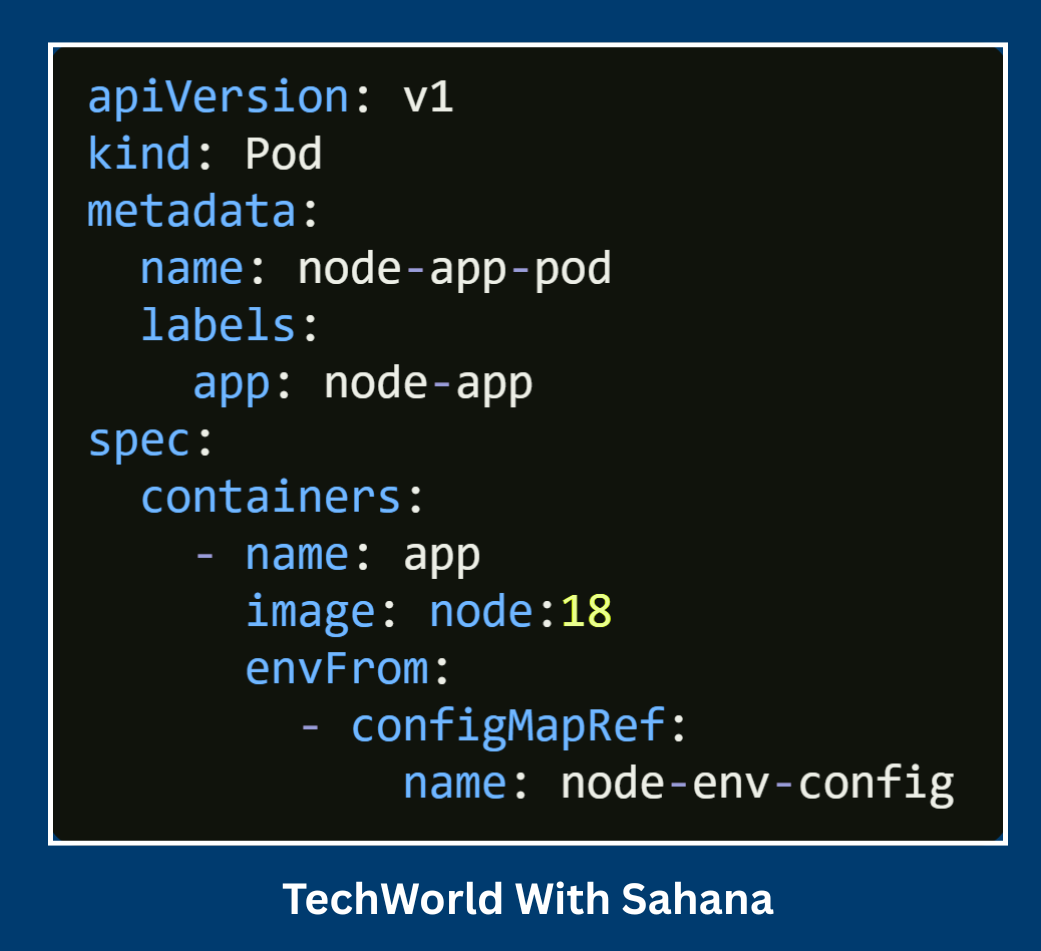
Full playlist: Module 2 - Kubernetes Real World YAML Creation
Here’s the flow Step by Step based on YAML:
Kubernetes reads the YAML – It sees a Pod definition named
node-app-pod.Pod created – Kubernetes schedules it on an available node in the cluster.
Container pulled – From the
node:18image (Docker Hub).Container runs – Inside the Pod as
app.Environment variables loaded – From the
node-env-configConfigMap, soPORT,NODE_ENV, etc., are available inside the container.You apply it –
kubectl apply -f node-app-pod.yaml.You verify it –
kubectl get podsto ensure the Pod is inRunningstate.You access it –
kubectl exec -it node-app-pod -- bashto go inside, or later expose it via a Service for external access.
📺 Watch full explanation here:
“10 Kubernetes YAML Real-World Questions” video: