
Kubernetes Multi-Container Pod Best Practices: Sidecar Containers, Shared Volumes & Logging with Elasticsearch
Learn how to build a Kubernetes multi-container Pod using a sidecar logging pattern, shared volumes, and Elasticsearch to achieve scalable, secure, and production-ready log management.

1. Introduction
Explain the scenario: e-commerce app, payment-service container + log-processor container
State why multi-container pods, sidecars, and shared volumes are relevant
Preview what the reader will learn: architecture, YAML examples, best practices, pitfalls, scalability, monitoring
In many real-world applications, it’s common to see a main app container plus a logging / sidecar container inside the same Pod. This pattern helps with log collection, observability, and keeping your architecture modular.
2. Why Use Multi-Container Pods & Sidecar Logging?
2.1 Separation of Concerns
The main app (payment service) focuses on business logic
The sidecar / log-processor handles parsing, filtering, forwarding logs to Elasticsearch
2.2 Shared Context & Low Latency
Because they live in the same Pod and share a filesystem (volume), the log-processor can read logs immediately
No network hops or external file pulls
2.3 Scaling as a Unit
The Pod is the scaling unit in Kubernetes; both containers scale together
Easier management, less orchestration overhead
2.4 Observability & Logging Pipelines
Send structured logs (JSON, etc.) to Elasticsearch / ELK / ELK stack
Enable monitoring, metrics, search, dashboards
Chapter 3 — Kubernetes POD Explained @TechWorldWithSahana
Topics Covered in the Video (Easy to Understand Animation):
1️⃣ What is Pod
2️⃣ LifeCycle of a Pod
3️⃣ What are Init Containers
4️⃣ InitContainer Lifecycle
5️⃣ Multi-container Pods
6️⃣ Basic Pod YAML Structure
7️⃣ Pod Networking in Kubernetes
8️⃣ Pod Affinity and Anti-affinity
9️⃣ Real World Pod YAML
3. Architectural Considerations & Patterns
3.1 Volume Type: emptyDir, hostPath, Persistent Volume
For ephemeral logs,
emptyDiris commonIf you need persistence beyond Pod lifetime, use PersistentVolume
HostPath can be dangerous / less portable
3.2 Log Format & Rotation
Logs should be in structured format (JSON, key-value) to ease parsing
Rotate or truncate large logs to avoid disk overflow
3.3 Buffering & Backpressure
The sidecar should handle bursts: buffer logs, backoff, retry to Elasticsearch
Avoid blocking the main container
3.4 Error Handling & Fault Tolerance
If log forwarding fails, it should degrade gracefully (e.g. retry, drop, alert)
The main container should not get blocked or crash because log sidecar fails
3.5 Security & Access Controls
Use RBAC, network policies so that the sidecar has minimal privileges
Don’t give full cluster permissions just for log shipping
3.6 Resource Limits & QoS
Set CPU / memory requests/limits on both containers
Ensure sidecar doesn’t starve main container
4. YAML Example: Deployment with Sidecar & Shared Volume
Here’s a sample Deployment YAML you can use or adapt:
apiVersion: apps/v1
kind: Deployment
metadata:
  name: payment-with-logger
spec:
  replicas: 3
  selector:
    matchLabels:
      app: payment-with-logger
  template:
    metadata:
      labels:
        app: payment-with-logger
    spec:
      volumes:
        - name: shared-logs
          emptyDir: {}
      containers:
        - name: payment-service
          image: myorg/payment-service:latest
          ports:
            - containerPort: 8080
          volumeMounts:
            - name: shared-logs
              mountPath: /var/log/payment
          # Optionally set resource requests/limits
          resources:
            requests:
              cpu: “200m”
              memory: “256Mi”
            limits:
              cpu: “500m”
              memory: “512Mi”
        - name: log-processor
          image: myorg/log-processor:latest
          env:
            - name: ELASTICSEARCH_URL
              value: “https://es.example.com:9200”
          volumeMounts:
            - name: shared-logs
              mountPath: /var/log/payment
          resources:
            requests:
              cpu: “100m”
              memory: “128Mi”
            limits:
              cpu: “300m”
              memory: “256Mi”
You can add liveness/readiness probes, securityContext, sidecar init steps, etc.
5. Best Practices & Tips
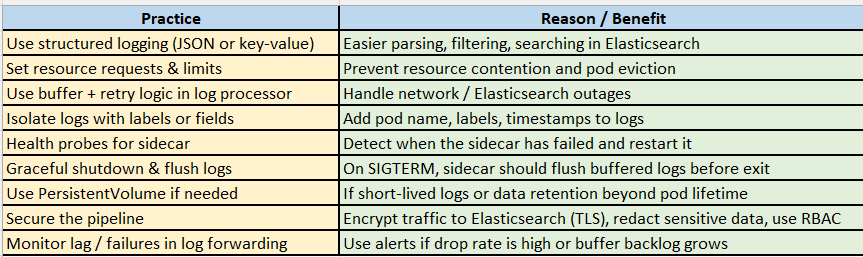
Watch Hands-On Under 1Min-
What is Multi Container Pod?
Kubernetes Multi-Container Pod: Payment Service with Sidecar Log Processor & Shared Volume
Real-Time Log Shipping in Kubernetes: Sidecar Container Setup with Shared Volumes
6. Common Pitfalls & How to Avoid Them
Log volume overload — writing too many logs, sidecar can’t keep up
Mitigation:* sampling, filtering, rate limiting
Disk exhaustion — logs fill the
emptyDirvolumeMitigation:* rotate, limit log file sizes
Sidecar crash affects the pod — e.g. causing CrashLoopBackOff
Mitigation:* separate probes, ensure sidecar errors don’t kill main container
Tight coupling / version mismatch — sidecar image incompatible with log format
Mitigation:* version pinning, contract tests
Single point of failure (Elasticsearch downtime) — sidecar blocking
Mitigation:* fallback queues, buffering, alerting
7. Scaling, Upgrades & Versioning
Because both containers live in the same Pod, scaling is simple via
replicaCountFor blue/green or rolling upgrades, ensure the sidecar’s new version can still parse old log formats
Use labels/annotations to manage version compatibility
If needing independent scaling (rare), Kubernetes does not directly support scaling containers separately; you may need separate deployments + communication patterns instead
8. Observability & Monitoring (Beyond Logging)
Use Prometheus + exporters or OpenTelemetry for metrics and traces
Send logs to Elasticsearch + Kibana (ELK / EFK stack) for dashboards, search, alerting
Correlate logs, metrics, traces using labels like
pod,request-id,trace-idAdd dashboards for log-forwarding success/failure, buffer size, latency
9. Sample Walkthrough: How It Works in Practice
Payment-service writes logs to
/var/log/payment/app.logLog-processor sidecar tails (or reads) the log file, transforms to JSON
It adds metadata: pod name, timestamp, labels
It sends batches to Elasticsearch URL via HTTP
Elasticsearch indexes logs; users can query via Kibana / search UI
If Elasticsearch is unreachable, sidecar buffers and retries
Upon pod termination, sidecar flushes pending logs and exits cleanly
You could show a sequence diagram or flowchart here (useful for visuals and SEO via alt text).
10. Conclusion & Next Steps
Recap: using multi-container Pods + sidecar + shared volumes is a robust pattern for logging in Kubernetes
The advantages: separation of concerns, scaling together, lower latency, integrated observability
But it requires good design: buffer, security, resource limits, error handling
Next steps:
Prototype with your own app + log sidecar
Add metrics, alerting, dashboards
Extend to multi-tenant, high-availability, security hardened setups